Offline Music Player- Solo
- 4.6
- Rating
- 1.00M
- Installs
- Free
- Price

 Analysis by App-foxy
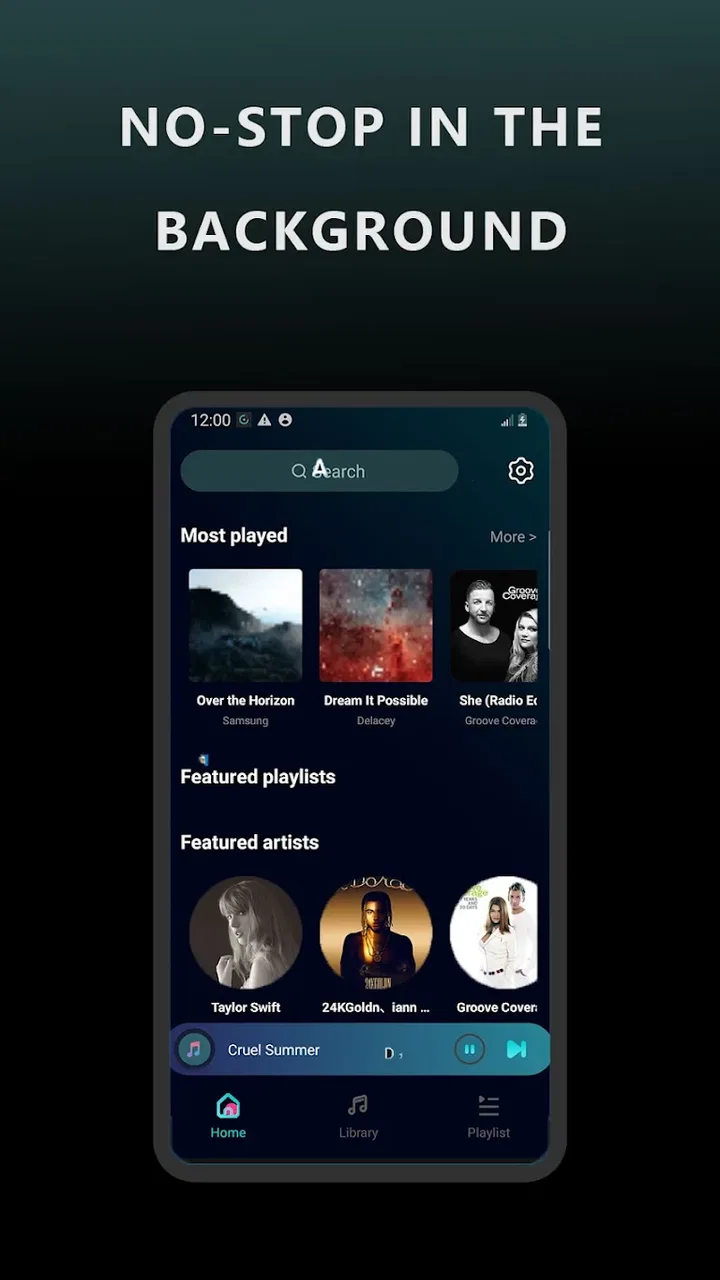
I spent time with Offline Music Player- Solo as a straightforward way to listen to music already available on a phone. It belongs to the Music & Audio category, and its appeal is easy to understand: instead of depending on a constant connection or a large streaming catalog, it focuses on playing local music. That makes it especially relevant for commutes, flights, weak-signal areas, and anyone who prefers keeping a personal collection close at hand.
The app is free to download, with optional in-app purchases ranging from $2.99 to $19.99 per item. It is developed by TingCoco, has an Everyone content rating, and supports devices running Android 8.0 or later. Its current version is 2.2.2, while the app was released on December 3, 2024. Those details matter because an older phone may still be compatible, but the experience can depend heavily on how that phone stores and exposes music files.
Where the first listening session can go wrong
The biggest source of confusion with an offline player is usually not playback itself. It is finding the music. People often install an app expecting it to behave like a streaming service, then wonder why a familiar album or artist does not appear immediately. A local player normally needs music files that are already stored on the device, so an empty library does not necessarily mean the app is broken.
You May Also Like

 Blood Strike: 2.5 Anniversary
Blood Strike’s Loadouts Turn Every Drop Into a Tactical Gamble
A close look at Blood Strike’s custom loadouts: how fast access to signature weapons reshapes its battle royale rhythm, rewards preparation, and narrows the gap between fights.

 Pandora - Music & Podcasts
Pandora’s Music Is Easy to Start, but Harder to Recover
Pandora’s strength is its low-effort path from a seed to a station. Its weak spot is how much confidence it asks you to place in connection, setup, and quiet recovery.

 8 Ball Pool
 Is Built on Rivalries, Rematches, and Routine
A close look at the rivalries, rematches, shared routines, and unanswered safety questions that turn a quick pool match into a persistent mobile community.

 Samsung Music
’s Quiet Strength Is Playing What You Already Own
Its reach comes less from spectacle than from dependable access to a personal library. That simplicity is both the app’s strongest retention engine and its ceiling.

 AccuWeather: Weather Radar
AccuWeather Review: A Quick, Clear Forecast for Everyday Decisions
For everyday plans, the best forecast is the one you can understand quickly. AccuWeather makes rain timing, radar, and local conditions easy to act on, with a few trade-offs.

 Hill Climb Racing
Why Hill Climb Racing Still Turns Crashes Into One More Run
A tiny car, a bumpy hill and one more upgrade: Hill Climb Racing keeps resurfacing because its simple chaos makes every near-miss feel personal.
More From Our News Desk
View All News


That distinction is the first thing I would explain to a friend. This is not the best choice if you want to search an online catalog, discover new releases, or press play on music that has never been downloaded. Its purpose is much narrower and, for the right listener, more convenient: it gives you a place to play music that you already own or have legally saved for offline listening.
I also found that the first scan can feel less obvious than expected. A new user may see a quiet library and assume setup has failed, particularly if the files are in an unusual folder, on removable storage, or handled by another app. Before changing settings repeatedly, I would check whether the tracks can be found in the phone’s ordinary file manager. If they are not visible there, the music player has nothing reliable to read.
Another common sticking point is confusing an audio file with an app shortcut, a cloud placeholder, or a download that is only available inside another service. A song that plays in a streaming application is not automatically a local file that an offline player can use. This is an important trade-off compared with streaming alternatives: you gain independence from the network, but you must take responsibility for the files and their location.
The app’s store summary invites users to download it and enjoy it, while the short description identifies it simply as an offline music player. I read that as a useful warning against expecting a full streaming ecosystem. The strength is focus, not breadth. If your goal is quiet, personal playback rather than recommendations and online search, that focus works in its favor.
What I would check before blaming playback
My first check would be the track format and whether the file is complete. A damaged or partially copied file can fail in one player and still appear in a folder, which makes the problem look like an app issue. I would test two or three known-good tracks rather than importing an entire collection at once. That makes it easier to tell whether the problem affects the library, one file, or the phone’s storage.
I would also look at the file names and folder structure. Very long names, unusual symbols, or deeply nested folders can make a collection harder to manage even when the files themselves are valid. Keeping a small test folder with a few clearly named songs is a practical way to confirm that the basic workflow is working before reorganizing a large library.
For an everyday example, imagine preparing for a train journey through areas with poor reception. I would copy a small selection of albums to the phone, open the player while still at home, and start each one briefly. That simple test confirms that the files are actually local and gives the library time to recognize them. It is far better than discovering at the station that the music was only available through an online service.
Setup checks that save time
My recommended setup is deliberately boring. First, make sure the phone has enough free storage for the music you intend to keep. Next, place a few test tracks in a location the device can access normally. Then open Offline Music Player- Solo and give it a moment to display the collection. If the library remains empty, I would close and reopen the app after confirming the files are present, rather than immediately reinstalling it.
It is also worth checking Android’s battery and background restrictions if playback stops unexpectedly when the screen turns off. These controls vary by phone manufacturer, so the names and locations can differ. I would not change several system settings at once. Adjusting one relevant battery or background option, then testing again, makes the result much easier to understand.
Storage behavior deserves special attention. Moving files between internal storage, a memory card, and a computer can change their location without changing their names. A library that worked yesterday may appear incomplete simply because the music was moved. Before importing everything again, I would search for one missing track and verify where it now lives.
When using headphones or a wireless speaker, I would test the phone’s own speaker first. If sound works there, the player is probably reading the file correctly and the next check should be the output connection, volume level, or selected audio device. Separating the playback test from the accessory test prevents a Bluetooth pairing problem from being mistaken for an app failure.
The app is free, which makes this testing process low-risk. The optional purchase range is something I would consider only after confirming that the basic offline workflow suits me. I would not pay simply to solve a library problem before checking the files, storage location, and phone settings. A purchase cannot repair missing or unreadable music.
Because the app is rated for Everyone, it is approachable for a broad audience, including someone who wants a simpler music tool on an older compatible phone. Still, “simple” does not mean every device behaves identically. Android’s file handling, power management, and audio routing can vary noticeably from one handset to another, so a careful first test is more useful than assuming the same steps will work everywhere.
A more reliable personal library routine
I recommend building the library in small batches. Start with one artist or one playlist, confirm that the tracks appear and play, and only then add more. This is one of the most useful habits for an offline player because it exposes naming or storage problems early. Importing a large, disorganized collection at once makes it difficult to know which file caused trouble.
I would keep a backup of the music outside the phone as well. An offline player is only as dependable as the local files it receives. If a device is lost, reset, or replaced, the app cannot recreate a personal collection that was never backed up. This is not a criticism unique to this player; it is the practical responsibility that comes with choosing local playback over a cloud-based library.
There is also a privacy and convenience balance. Local files can reduce dependence on accounts and network access, but they require manual organization. Streaming services handle catalog updates and synchronized libraries for you. Here, I get more direct control, but I also need to know where my music is and how I want it arranged.
Recovering a workflow after something stops working
When a track disappears, I would follow a fixed sequence instead of repeatedly tapping around. I would first locate the file with the phone’s file manager, then try another known-good track, then reopen the player. If only one song fails, I would treat that file as the likely problem. If the entire collection is missing, I would focus on storage access, the folder location, and whether the files were moved.
If playback stops when the display goes dark, I would compare two situations: playing with the screen awake and playing after locking the phone. That simple comparison tells me whether the issue is connected to background operation or to the audio file itself. From there, I would inspect the phone’s battery controls and avoid aggressive power-saving modes during the test.
For Bluetooth trouble, I would disconnect and reconnect the accessory, confirm that another phone is not receiving the sound, and test the player through the handset speaker. If every other audio app also fails through the same headphones, the accessory or connection is the more likely cause. This kind of isolation is much faster than deleting the music library.
After moving a collection, I would avoid creating duplicate copies in several folders. Duplicates can make a library feel untidy and can lead to uncertainty about which version is being played. A cleaner recovery is to choose one main music folder, place a few confirmed files there, and rebuild the collection gradually. The goal is not merely to make one song play; it is to restore a predictable routine.
Reinstalling should be a later step, not the first one. It may remove local app state, but it will not restore music files that were deleted or moved. Before taking that action, I would make sure the original tracks are backed up and that I know where they are stored. If the issue is caused by the phone’s storage or audio output, reinstalling may only add extra work.
The same principle applies to updates. The current version is 2.2.2, so keeping the app current can be sensible when an update is available through the normal app store. But I would still test the basic library after an update, especially if the phone has limited storage or the music collection is important. A short check after maintenance is easier than troubleshooting during a trip.
When the app is not the cause
Some problems sit outside the player entirely. A phone that is nearly full may behave unpredictably, a memory card may be failing, and a damaged cable may create incomplete copies from a computer. In each case, the app may only be revealing a storage problem that would affect other applications too.
Audio output can also mislead you. A muted media channel, a connected car system, a speaker with its own volume control, or a forgotten Bluetooth connection can make a perfectly good file seem silent. I always test with the phone speaker and a short, known-good track before changing the library.
File permissions and system access can vary across Android versions and manufacturers. Since the minimum supported operating system is Android 8.0, compatible phones can still have very different storage interfaces. If the app cannot see files that the file manager can see, I would review the phone’s app access settings and restart the device before assuming the music itself is unsupported.
There is another subtle issue: some music is protected or locked inside the service that supplied it. Being able to listen to a song in another app does not prove that a separate local player can open it. In that situation, switching players may not help. The limitation belongs to how the music was delivered, not necessarily to Offline Music Player- Solo.
This is where the comparison with usual alternatives becomes important. A streaming service is better for discovery, synchronized playlists, and a large searchable catalog. A manufacturer’s built-in player may be better if you want tight integration with the phone’s own file browser or car controls. A dedicated offline player like this one makes more sense when you already have local tracks and want a focused place to play them without depending on a live connection.
I would skip it if my music life is mostly online, if I expect automatic recommendations, or if I do not want to organize files myself. I would also look elsewhere if advanced library management is my priority and I need highly specialized tagging or catalog tools. The app’s value comes from reducing the distance between stored audio and playback, not from trying to replace every kind of music service.
My practical verdict after using it
Offline Music Player- Solo is a sensible choice for listeners who understand what “offline” means in practice. I like the directness: keep music on the phone, open a dedicated player, and listen without relying on reception. That is useful for travel, exercise in areas with weak coverage, older devices, and anyone who prefers a personal collection over an algorithm-driven catalog.
The main friction is the setup responsibility. The app cannot make missing files appear, repair damaged copies, or overcome a phone that routes sound to the wrong device. New users should spend a few minutes checking file locations, testing a small group of tracks, and confirming playback through the phone speaker before building a larger library. That small routine prevents most avoidable confusion.
Its audience is already substantial, with more than a million installs, and the average rating is 4.6 from roughly 8,600 ratings. I see those figures as encouraging signs of broad interest, but they do not remove the need to match the app to your habits. A popular offline player is still the wrong tool for someone seeking a streaming catalog or automatic cloud synchronization.
For me, the strongest use case is a prepared local collection: a few albums copied to the phone, tested before leaving home, and kept in a clear folder structure. The weakest use case is an expectation that the app will behave like a search-based streaming platform. Once that boundary is understood, the experience becomes much more predictable.
I would recommend trying the free version before considering any optional purchase. Check whether your existing music appears, whether playback continues as expected with the screen locked, and whether your headphones or speaker receive audio correctly. If those basics work and you value local listening, this app offers a practical, uncomplicated solution. If they do not, the problem may be your files, storage, or audio connection rather than the player itself.
My final view is positive but measured: this is a focused Music & Audio app for people who want control over music stored on their device. It is not a replacement for every alternative, and its simplicity leaves more organization work to the user. For the right listener, though, the most useful feature is the dependable offline routine you build around it, rather than a long list of extras.
In short, I would keep it installed on a compatible Android phone when local playback matters more than online discovery. TingCoco has aimed at a clear everyday purpose, and the free entry point makes it easy to test that purpose with your own files. Just verify the storage and output path first; that one habit makes the difference between a frustrating empty library and a player that quietly does exactly what you need.
FAQs for Offline Music Player- Solo
01What are the main features of Offline Music Player - Solo?
Offline Music Player - Solo allows users to listen to their favorite music without an internet connection. It supports various audio formats such as MP3, AAC, and FLAC. The app also offers customizable playlists, an equalizer for enhanced sound quality, and a sleek, user-friendly interface. Additionally, it provides a sleep timer and background playback for convenience.
02Does Offline Music Player - Solo require an internet connection to function?
No, Offline Music Player - Solo is designed to operate without an internet connection. Once you have downloaded your music files onto your device, you can enjoy them anytime, anywhere without needing Wi-Fi or data. This makes it a perfect choice for travel or areas with poor connectivity.
03Is Offline Music Player - Solo compatible with both Android and iOS devices?
Yes, Offline Music Player - Solo is available for both Android and iOS platforms. It is optimized to run smoothly on a wide range of devices, ensuring that users have a consistent and reliable experience regardless of their operating system. You can find the app on both the Google Play Store and Apple App Store.
04Can I create and manage playlists in Offline Music Player - Solo?
Absolutely! Offline Music Player - Solo provides a comprehensive playlist management feature. Users can create, edit, and organize playlists with ease. Whether you want to sort your music by genre, artist, or mood, the app offers flexibility and control to personalize your music experience.
05Does Offline Music Player - Solo have any in-app purchases or ads?
Offline Music Player - Solo is free to download and use, but it may contain ads to support development. There are optional in-app purchases available that can remove ads and unlock additional features, enhancing the user experience. These purchases are entirely optional, allowing users to enjoy the basic functionalities without any cost.
Pros
- No internet needed for playback.
- User-friendly interface design.
- Supports multiple audio formats.
- Customizable playlists available.
- High-quality sound output.
Cons
- Limited advanced features.
- No integrated music store.
- Ads can be intrusive.
- Lacks cloud backup options.
- No social sharing features.

Offline Music Player- Solo
Gallery